Changelogs
Stay up to date with the latest changes and enhancements.
Stay up to date with the latest changes and enhancements.

12. Feb 2026
Share
We’ve added a new way for you to refine your posts directly inside Heyoo.
With AI Text Edit Shortcuts, you can now adjust specific parts of your text in just a few clicks. Instead of rewriting everything or prompting endlessly, you just highlight what you want to improve and let Heyoo support you instantly.
 What’s new exactly?
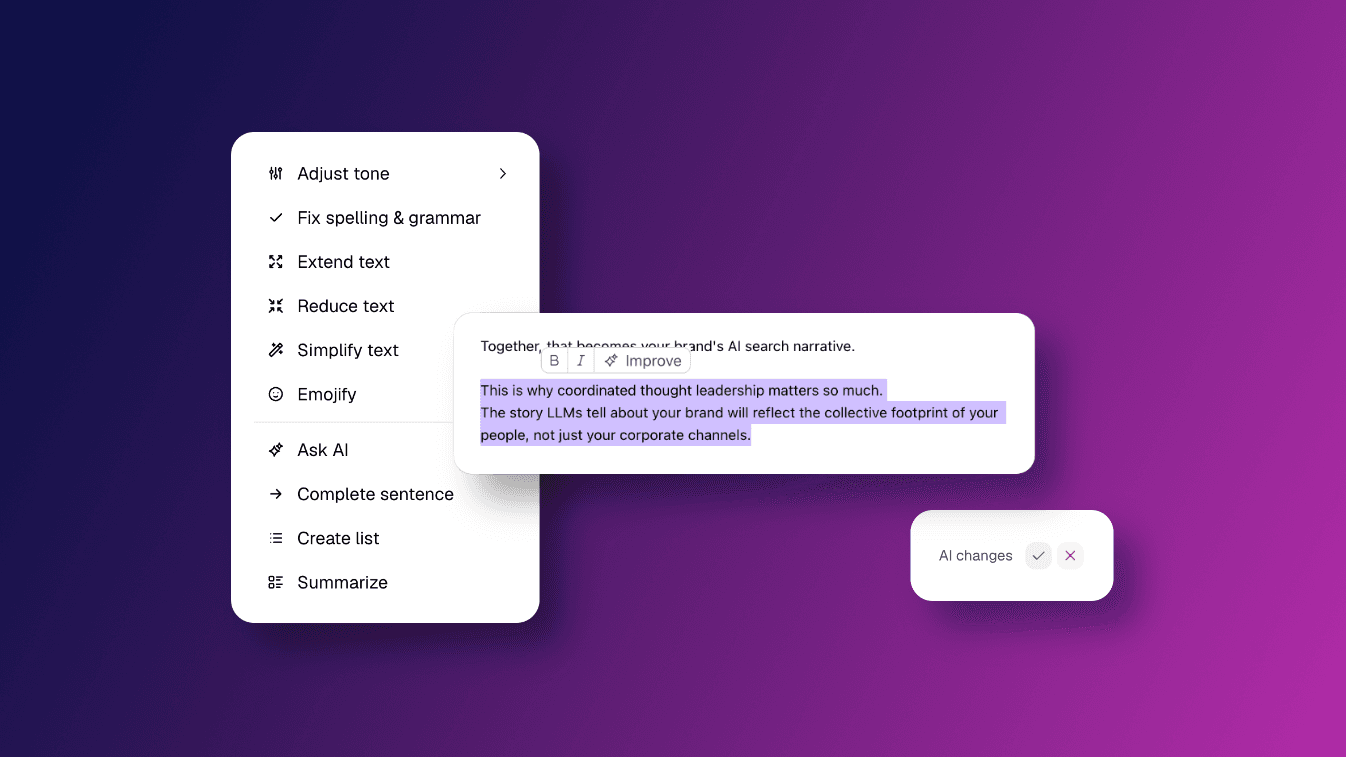
Inside the editor, you can now highlight any sentence or paragraph and click Improve. With one click, you can now easily adjust entire blocks of text. A compact action menu opens, giving you direct access to different editing options.
You can:
Adjust tone to make your text more conversational, more confident or more formal depending on the context.
Fix spelling & grammar to clean up language issues while keeping your original message.
Extend text to add more depth or context to a short section.
Reduce text to make a paragraph more concise without losing its core meaning.
Simplify text to clarify complex phrasing and improve readability.
Emojify to add emojis that match context and your style.
Ask AI to apply a specific instruction to the selected text.
Complete sentence to naturally finish an unfinished thought.
Create list to turn free-flowing text into a structured list.
Summarise to condense a longer section into a shorter version.
Every suggestion is shown before anything changes. You can accept or decline it.
 How does this work in Heyoo?
You can use AI Text Edit Shortcuts wherever you write or customise posts.
When you open a campaign suggestion and click Customise, or when you create a new post in the Thought Leader Hub, you work inside Heyoo’s editor.
As soon as you highlight text, a small toolbar appears. Alongside formatting options, you now see the Improve button.
After selecting an action, Heyoo generates a revised version of the marked text only. The rest of your post remains untouched. You can review the proposed change and either accept it or discard it.
Because the editor is connected to your personal tone of voice settings and your company profile, the suggestions stay aligned with your style and strategic direction.
 Why did we build this?
Writing becomes easier when you are not starting from scratch. Editing becomes easier when you do not have to rewrite everything.
With AI Text Edit Shortcuts, you can:
Refine your message with proven prompts
Strengthen specific paragraphs without changing the whole post
Structure your thoughts more clearly
Adjust your tone depending on context
You stay in control of every change. The AI supports you, but you decide what gets published.
This makes it simpler to turn a good draft into a post that truly reflects you.
 Want to learn more about Heyoo.ai? Book a session here
 Want to see it for yourself? Sign up for a free trial