Changelogs
Stay up to date with the latest changes and enhancements.
Stay up to date with the latest changes and enhancements.

Stay up to date with the latest changes and enhancements.
19. Sep 2026
Share
The new Knowledge Base gives Heyoo detailed, relevant context about your company, so employee post suggestions and post drafts are grounded in the right facts, data points, product information and terminology.
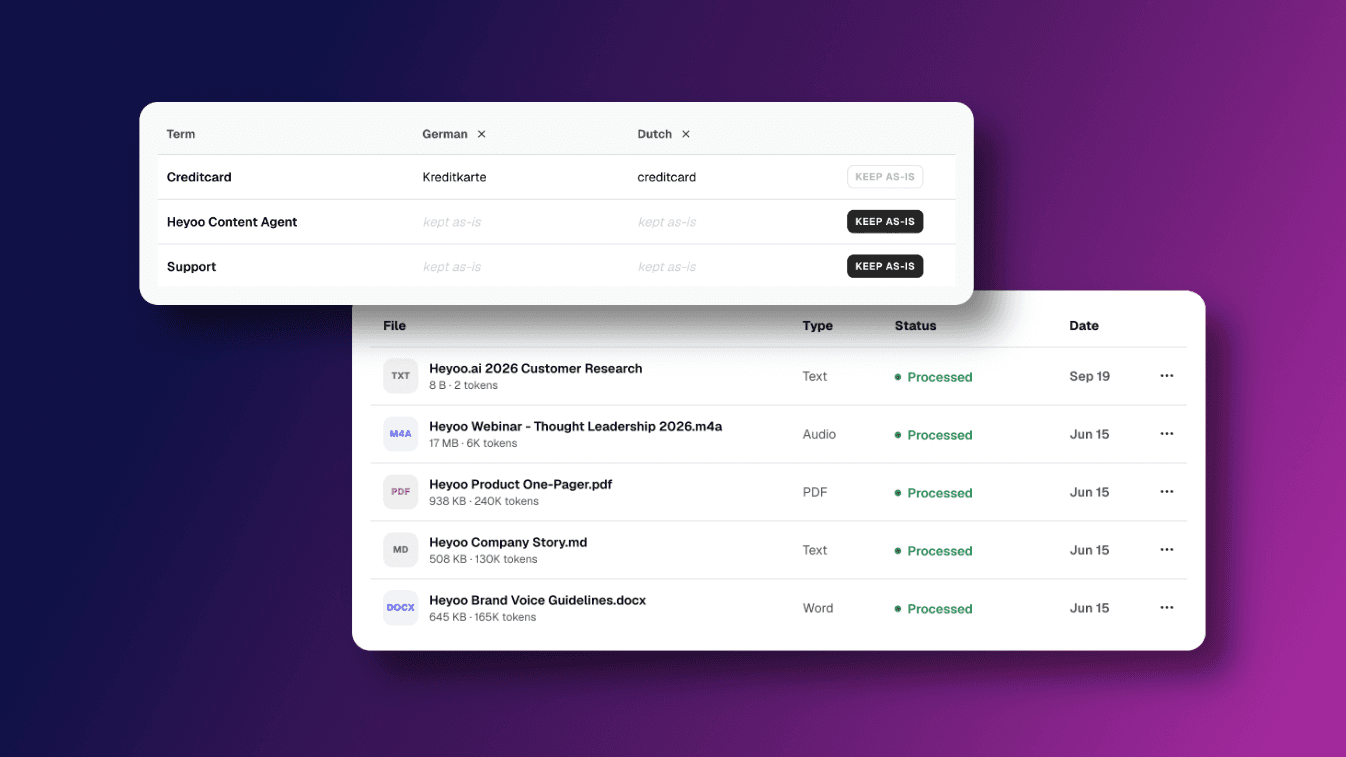
Add research, presentations, product and service information, proprietary data, company knowledge, terminology, abbreviations and other relevant context under Settings → Knowledge Base.
Heyoo uses relevant information from your Knowledge Base when creating content. This makes post suggestions and drafts more specific, accurate and informed by what your company actually knows.
And the company context does not replace the individual voice. Employees, executives and subject matter experts still bring their own perspective, experience and personal tone of voice.
Every company has valuable knowledge that should make its way into its LinkedIn content.
But that knowledge often lives in different places. Product details sit in documentation. Research findings live in reports. Customer insights are buried in presentations. Important terminology exists in internal guides. Proprietary data, benchmarks and frameworks might only be known by a small group of people.
The Knowledge Base brings this context into Heyoo and makes it available when content is created.
Some of the most valuable input can be knowledge that only your company has: your own research, survey results, benchmarks, customer insights, product data, methodologies or learnings from work your team has actually done.
For example:
• Your company conducted an industry survey: Add the research to the Knowledge Base so Heyoo can use relevant findings and data points when creating posts around that topic.
• Your team has its own methodology or product terminology: Add it to Heyoo so post suggestions reflect the actual framework, facts and language your company uses.
This is also becoming increasingly relevant for AI visibility. Research into LinkedIn content cited in AI search points towards the importance of original expertise, useful explanations, specific evidence and data. Knowledge that only your company has gives your employees and experts something genuinely valuable to contribute.
Our article Employee Advocacy Is How You Build AI Search Visibility on LinkedIn goes deeper into why company expertise, proprietary knowledge and individual employee perspectives matter for AI search. Read the article
The Knowledge Base has two parts:
1. Company knowledge
Build a central source of company context for Heyoo, including:
• Product and service information
• Research and proprietary data
• Industry knowledge
• Company positioning and stories
• Internal terminology and abbreviations
• Product names and descriptions
• Presentations and other relevant company material
Upload supported files (.pdf, .md, .docx, audio and more) or add information directly as text.
Heyoo draws on relevant information from your Knowledge Base when creating employee post suggestions and post drafts.
2. Languages
Your company terminology should stay correct and consistent, even when content is created in different languages.
In the Languages section, admins can:
• Add company specific terms
• Define the preferred translation for each language
• Add additional languages
• Mark terms as Keep as is when they should remain unchanged
• Manage terminology centrally across the workspace
This is especially useful for product names, technical terminology, abbreviations and other wording that needs to remain accurate across languages.
Go to Settings → Knowledge Base.
Under Files, add the company knowledge and context Heyoo should use when creating content.
Heyoo then draws on relevant information from those sources when creating employee post suggestions and post drafts.
Under Languages, define exactly how important terminology should be written in different languages or mark terms that should always remain unchanged.
The result is more specific and informed LinkedIn content grounded in your company's real knowledge, without making everyone sound the same.
The Knowledge Base is now live under Settings → Knowledge Base in Heyoo.
 Want to learn more about Heyoo.ai? Book a personal demo here
 Want to see it for yourself? Sign up for a free trial
16. Jul 2026
Share
Finding relevant topics for employee advocacy and thought leadership often still means manually checking company blogs, industry publications, LinkedIn Pages and other sources.
With the new Heyoo Content Agent, admins can define the sources that matter to their company and let Heyoo automatically monitor them for relevant LinkedIn content inspiration.
The Content Agent turns new source content into campaign suggestions for admins or personalised post suggestions for individual employees.
This means you can set up your content discovery workflow once, define what Heyoo should look for and who it should be relevant to, and let the Content Agent keep bringing new suggestions into the right place in Heyoo.
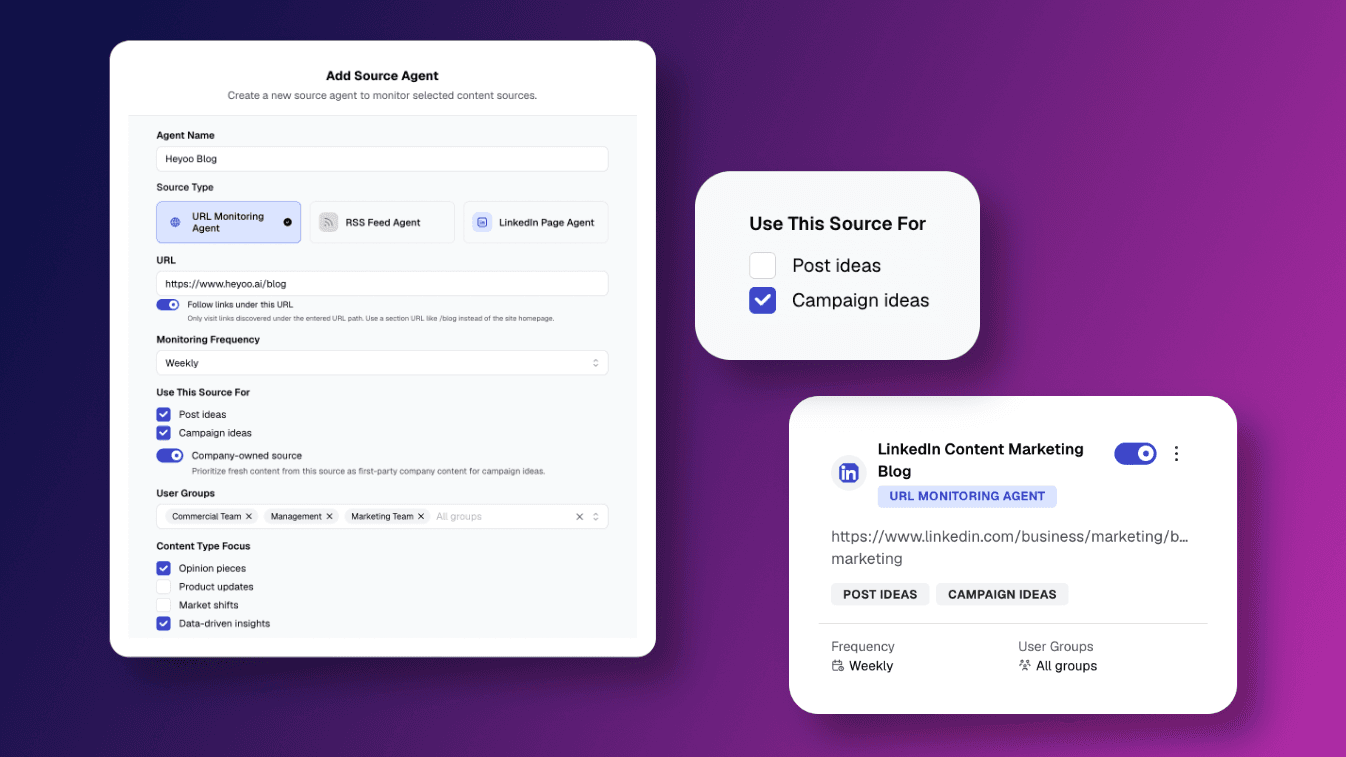
Admins can find Content Agent Sources in the main menu and add different types of sources, including:
• Blogs and other URLs
• News outlets
• RSS feeds
• LinkedIn Pages
Heyoo also suggests relevant sources based on the company profile and what the company does.
For every source, admins can choose how Heyoo should use and monitor it. Settings include:
• Monitoring frequency
• Post ideas, campaign ideas or both
• Relevant employee groups
• Content type focus, such as opinion pieces, product updates, market shifts or data driven insights
• Additional prompt instructions
• Whether a source is company owned
Admins can manage all active sources from one overview and choose different sources for different employee groups.
This lets teams create their own automated content discovery workflow. You decide which sources Heyoo follows, what it should look for, how often it should check and whether the output should become campaign inspiration, personal post inspiration or both.
When a source is used for campaign ideas, Heyoo monitors it for relevant new content and suggests complete campaign inspiration briefs under Campaigns > Inspiration.
The admin stays in control of what actually becomes a campaign. They can review the suggested campaigns, choose the ones they want to use and further tweak the campaign before launching it to employees.
Heyoo also keeps track of recently used articles so the same source content does not continuously generate new suggestions.
Sources can also be used to generate individual post suggestions.
In this case, Heyoo turns relevant source content into suggestions tailored to the individual employee. Employees can find these ideas directly on their dashboard and under Create Post.
Because admins can assign sources to specific employee groups, different teams can receive inspiration from the sources that are most relevant to their work.
The Heyoo Content Agent connects ongoing content discovery directly with employee advocacy and thought leadership. The monitoring and suggestion workflow runs continuously in the background, while marketing stays in control of what gets used, how campaigns are shaped and what ultimately goes live.
Want to learn more about Heyoo.ai? Book a personal demo here
Want to see it for yourself? Sign up for a free trial
26. Jun 2026
Share
Tagging colleagues and LinkedIn Pages is now available directly in Heyoo.
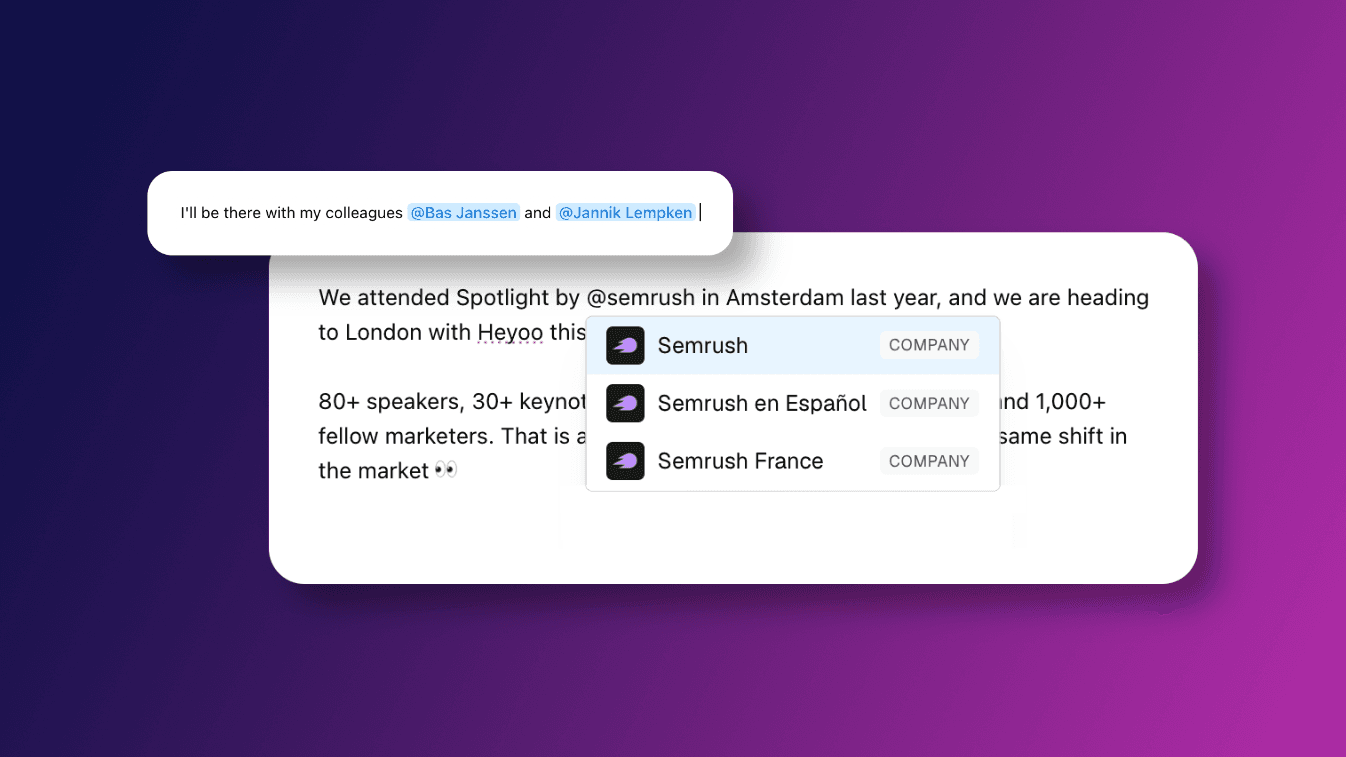
When creating a LinkedIn post, you can now type @ in the Heyoo post editor. From there, you can simply search and select both colleagues and LinkedIn Pages.
What’s new exactly?
You can now:
• Type @ directly in the Heyoo post editor
• Search and select colleagues
• Search and select LinkedIn Pages (e.g. company pages, customer pages, partner pages, event pages)
• Keep tags in place when posts are scheduled and published through Heyoo
Keep in mind: To tag a colleague, that person needs to have their LinkedIn account connected in Heyoo.
How does this work in Heyoo?
Tagging works directly inside Heyoo’s post editor.
When writing a post, simply type @ where you want to add a tag. Heyoo then lets you search and select the relevant colleague or LinkedIn Page.
Once selected, the tag becomes part of the post and stays in place when the post is prepared, scheduled or published through Heyoo.
Want to learn more about Heyoo.ai? Book a personal demo here
Want to see it for yourself? Sign up for a free trial
09. Jun 2026
Share
We have just launched a brand new Analytics dashboard that helps teams measure LinkedIn employee advocacy and thought leadership performance across the entire organisation within Heyoo.
Instead of collecting data from individual employees, combining results in spreadsheets and manually trying to understand what your LinkedIn strategy is creating, you can now measure the impact of your team posting on LinkedIn directly from within Heyoo.
Team Analytics gives admins a clear overview of team wide performance, while individual members can see how their own LinkedIn posts are performing.
As LinkedIn advocacy and thought leadership scale across more employees, reporting often becomes harder to manage.
Teams need to understand which employee groups are active, which people contribute consistently, which posts perform well and how LinkedIn activity contributes to business results. Without a central analytics view, this often means collecting screenshots, asking employees for data or maintaining separate spreadsheets.
Team Analytics brings this reporting into Heyoo where teams already create, coordinate and manage LinkedIn content.
It gives admins the visibility they need to understand the complete strategy, while giving employees and thought leaders useful feedback on their own activity.
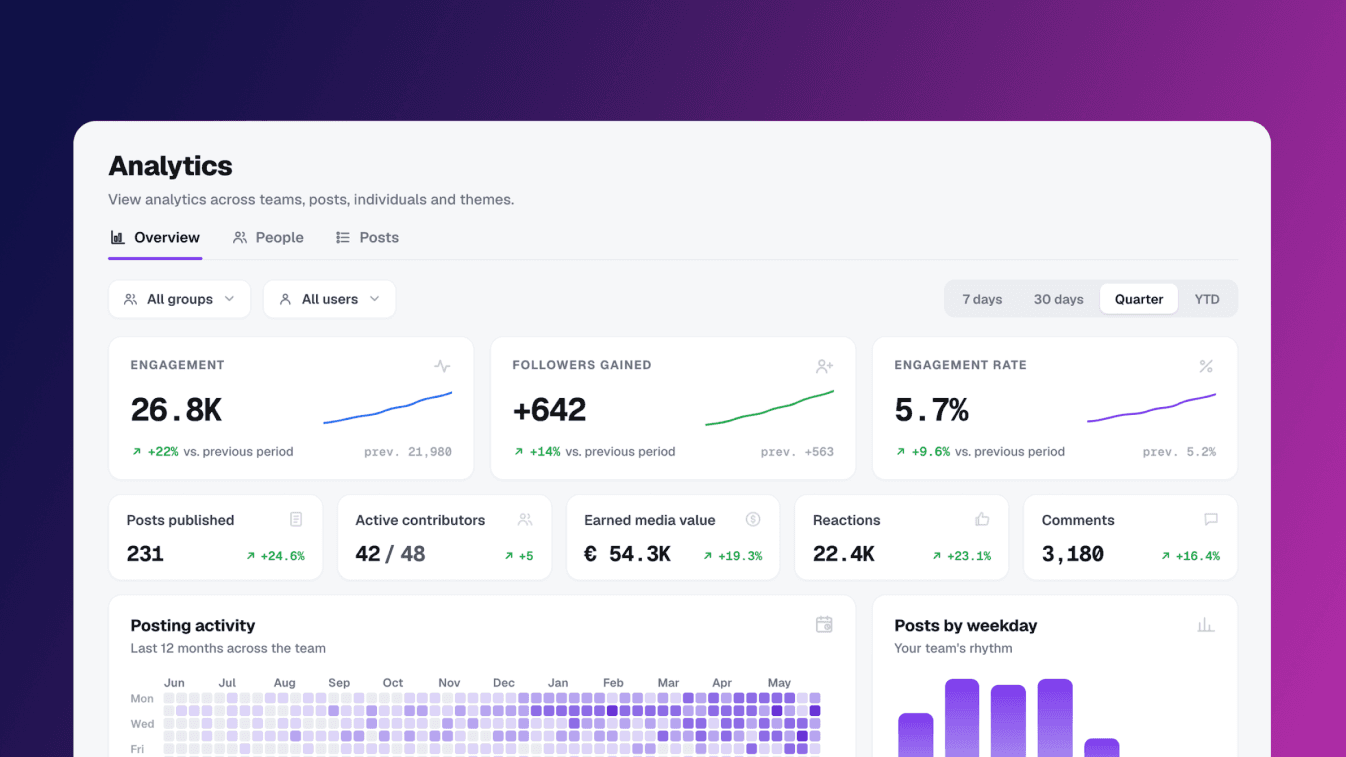
Admins can now measure team wide performance, including:
• Impressions & Engagement across all team posts
• Followers gained across the team
• Engagement rate
• Posts published
• Active contributors
• Earned media value
• Reactions and comments
• Posting activity over time
• Posts by weekday
• Peak posting day
• and more...
Admins can also filter and analyse performance by:
• Employee group
• Individual user
• Post type, including advocacy campaign posts and managed posts
• People level performance
• Post level performance
• and more...
Individual members can now measure their own performance, including:
• Impressions & Engagement
• Followers gained
• Engagement rate
• Published posts
• Earned media value
• Reactions and comments
• Posting activity over time
• Post level results
• and more...
Admins can open Analytics to see performance across the whole team.
The dashboard is split into different views, so you can move from a high level overview of the whole team to people level and post level performance.
The overview shows team wide performance, including engagement, followers gained, engagement rate, published posts, active contributors, earned media value, reactions and comments.
Admins can filter this view by employee groups, such as departments, country teams or other groups set up in the workspace. They can also filter by individual users to review specific contributors.
You can also separate advocacy campaign posts and managed or personal posts. This makes it easier to understand how different parts of the LinkedIn strategy are performing.
The people view shows performance per person.
Admins can compare contributors by number of posts, engagement, engagement rate, followers gained and trend indication. This helps teams understand who is active, where momentum is building and which groups may need more support.
The posts view shows individual posts across the team.
Admins can review post level performance, including clicks, reactions and comments. They can also filter this view by user, so it becomes easier to understand which posts and contributors are creating results.
Individual members (non-admins) also have their own Analytics tab in the left menu.
They see their own performance, including personal engagement, follower growth, posting activity and post level results. This gives employees and thought leaders useful feedback on their own LinkedIn activity.
With Heyoo’s new Analytics dashboard, teams can finally make the performance of LinkedIn employee advocacy and thought leadership visible in one shared overview.
Admins can understand what the full team is creating, compare performance across groups and report on ROI internally. Employees and thought leaders can see how their own posts perform, without needing access to the full admin dashboard.
The result is a clearer analytics layer for your LinkedIn strategy, built directly into Heyoo.
Want to learn more about Heyoo.ai? Book a personal demo here
Want to see it for yourself? Sign up for a free trial
26. Mar 2026
Share
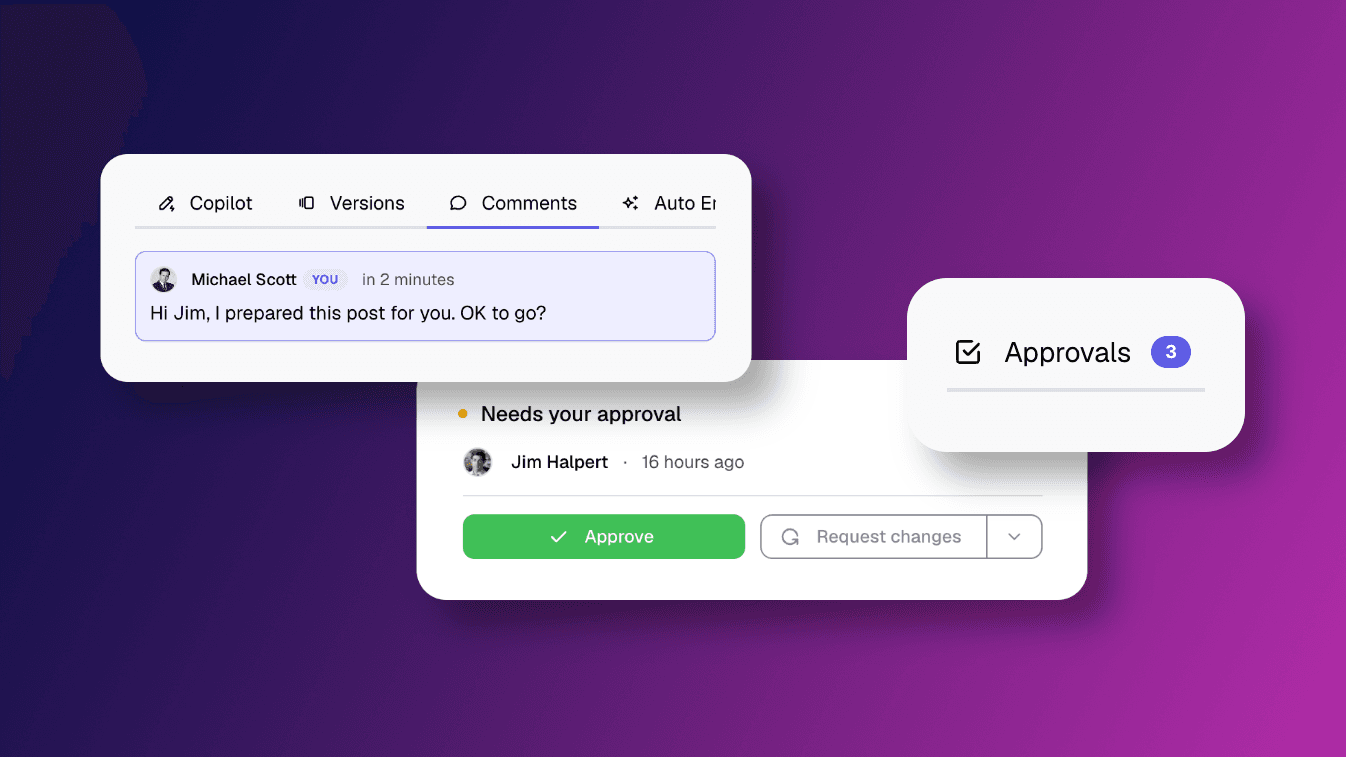
We’ve introduced a structured approval workflow that brings clarity and control to Managed Posting, without slowing down the process or compromising authenticity.
When marketing creates posts for employees, approval is no longer a separate step to manage manually. Instead, it is built directly into the way posts are created, reviewed, and published.
As managed posting scales, coordination typically becomes more complex.
Marketing teams need structure to plan and schedule content across multiple profiles, while employees and key voices need to stay in control of what is published in their name. Without a clear process, this often leads to back and forth, uncertainty, or delays in getting posts live.
The approval workflow introduces a clear, shared structure that removes this friction. It ensures that posts move forward efficiently, while still allowing employees to review, adjust, and personalise before publishing.
You can now:
• Automatically apply approval flows based on each employee’s personal settings
• Clearly see which posts require approval and which can be scheduled directly
• Manage all approvals in one central overview
• Collaborate on posts through comments, edits, and tracked changes
• Follow post status visually through a structured calendar system
Approvals adapt to each employee’s preferences.
Each user defines their own approval setup in their posting profile:
• Whether marketing can create posts for them
• Whether those posts require approval before publishing or not
Based on this, Heyoo automatically applies the correct workflow when a post is created.
Two possible flows:
1. Approval required
Marketing creates a post and clicks “Send for approval”.
The post is scheduled but remains pending until the employee approves it.
2. No approval required
Marketing can directly “Schedule post”.
They can still choose to send it for approval if review or personalisation is needed.
When a post is sent for approval, the employee receives it in their approval overview.
From there, they can:
• Review the full post content and visuals
• Edit the text to match their voice or perspective
• Add comments or context
• Approve the post
• Request changes with feedback
• Reject the post
Approval is not a rigid yes or no step. In most cases, employees refine the post and approve it in one flow, ensuring the final content still feels personal and authentic.
All edits and feedback remain visible, and changes can be compared directly. This creates a transparent collaboration loop between marketing and the employee.
The approval workflow is tightly connected to the Heyoo’s content calendar, giving a clear, real time overview of every post.
Each post is colour coded by status:
Light grey → Draft
Grey → LinkedIn not connected
Pink → In review by marketing
Yellow → Pending approval
Blue → Approved and scheduled
Green → Published
This makes it immediately clear which posts are ready to go live and which still require action.
With the approval workflow in place, marketing can coordinate content at scale without manual follow up, while employees and key voices remain fully in control of what is published in their name.
Feedback, revisions, and final approval all happen within one structured flow, making collaboration more efficient and transparent.
The result is a smoother process for everyone involved, with content that is both coordinated and genuinely personal.
Want to learn more about Heyoo.ai? Book a session here
Want to see it for yourself? Sign up for a free trial
27. Feb 2026
Share
We’ve added a new way to spark authentic thought leadership inside Heyoo.
With Post Inspiration Questions, marketing teams can provide structured, manageable prompts directly inside the platform.
This feature connects strategic guidance from marketing with individual reflection from employees.
Even with personalised post suggestions, many employees still face one simple barrier:
“What should I write about?”
Post Inspiration Questions remove that friction.
Instead of facing a blank page, employees are guided by relevant, thought-provoking prompts tailored to their role and context. The result is content that feels personal, reflective, and aligned with your broader brand narrative.
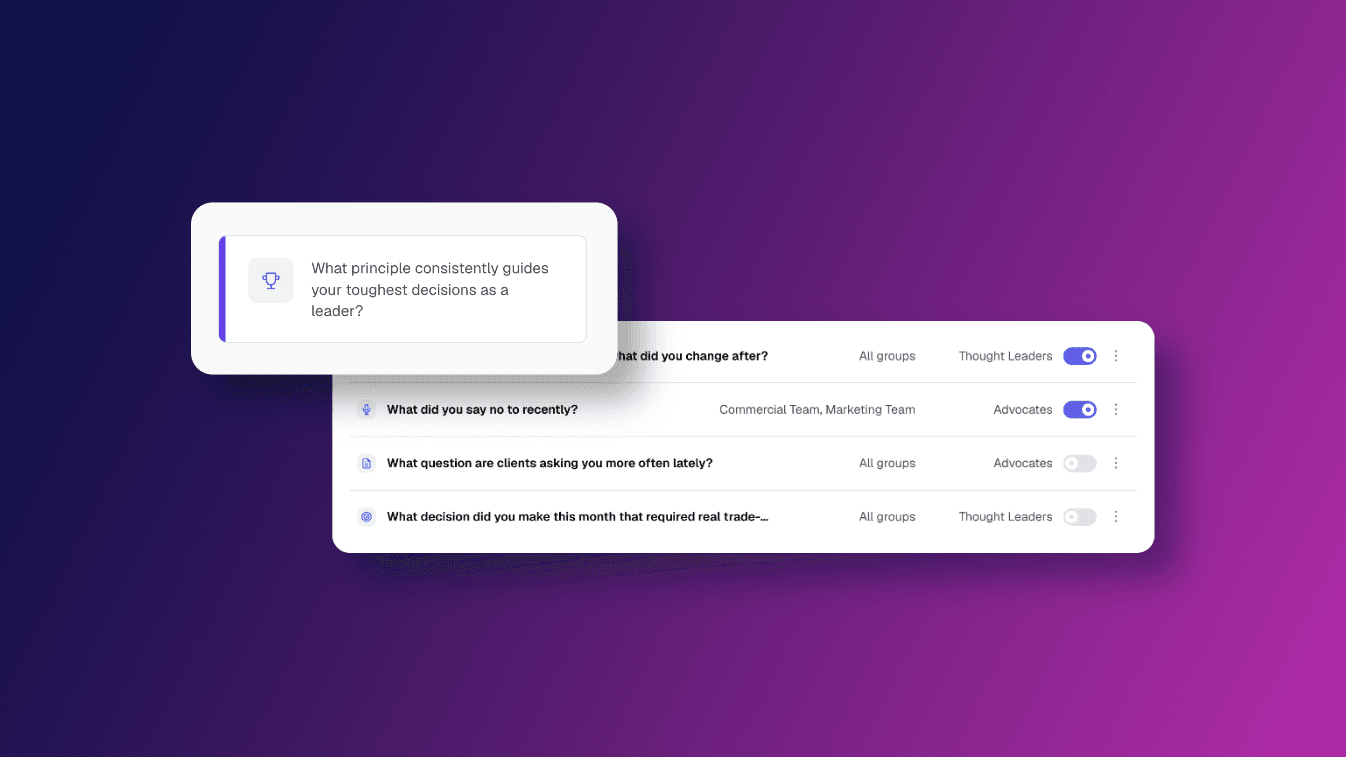
Under Settings → Inspiration Questions, admins can now fully manage the questions that appear inside Heyoo.
You can:
Create your own custom inspiration questions
Use and activate questions from the Heyoo library
Edit existing questions at any time
Add an optional description to guide deeper thinking
Assign questions to specific user types, such as Thought Leaders or Advocates
Restrict visibility to certain employee groups
Activate or deactivate questions, ideal for time-bound themes or campaigns
This means inspiration is no longer random. It becomes part of your structured content strategy.
You decide:
Which questions are visible
Who sees them
When they are active
How they are framed
For example:
Sales teams can receive questions about client conversations.
Customer Success can reflect on recent wins.
Leadership can be prompted to share strategic decisions or market perspectives.
Questions can be updated as priorities shift and temporarily activated for thematic focus periods.
In the Thought Leader Hub, employees now see an Inspiration Questions section directly below the post creation options.
When an employee clicks on one:
The post creation window opens automatically
The selected question appears as the main prompt
Any additional description is shown to encourage deeper reflection
The question context is automatically considered in the post generation process
Employees simply add their thoughts in the input field.
Heyoo then:
Combines the employee’s reflection with the selected question
Applies the personal tone of voice and posting profile
Aligns the content with company pillars and POVs
Generates a structured LinkedIn post draft
The question is not just shown as text. It actively shapes how the post is generated.
Post Inspiration Questions connect strategic alignment with authentic storytelling.
For marketing and comms teams, this means:
You can guide narratives around defined content pillars
Encourage specific angles or perspectives
Activate certain groups with relevant prompts
Keep messaging aligned without writing posts centrally
Adjust and refine inspiration over time
For employees and leaders, it means:
No blank page pressure
Clear, concrete starting points
A natural way to share personal experiences
Content that still feels entirely their own
The flow is simple:
Admin creates or edits Post Inspiration Questions
Questions are assigned to selected users or groups
Employees see them directly in the Thought Leader Hub
They choose a question and add their reflection
Heyoo generates a post aligned with their tone of voice, posting profile and the question as additional context
Want to learn more about Heyoo.ai? Book a session here
Want to see it for yourself? Sign up for a free trial
12. Feb 2026
Share
We’ve added a new way for you to refine your posts directly inside Heyoo.
With AI Text Edit Shortcuts, you can now adjust specific parts of your text in just a few clicks. Instead of rewriting everything or prompting endlessly, you just highlight what you want to improve and let Heyoo support you instantly.
 What’s new exactly?
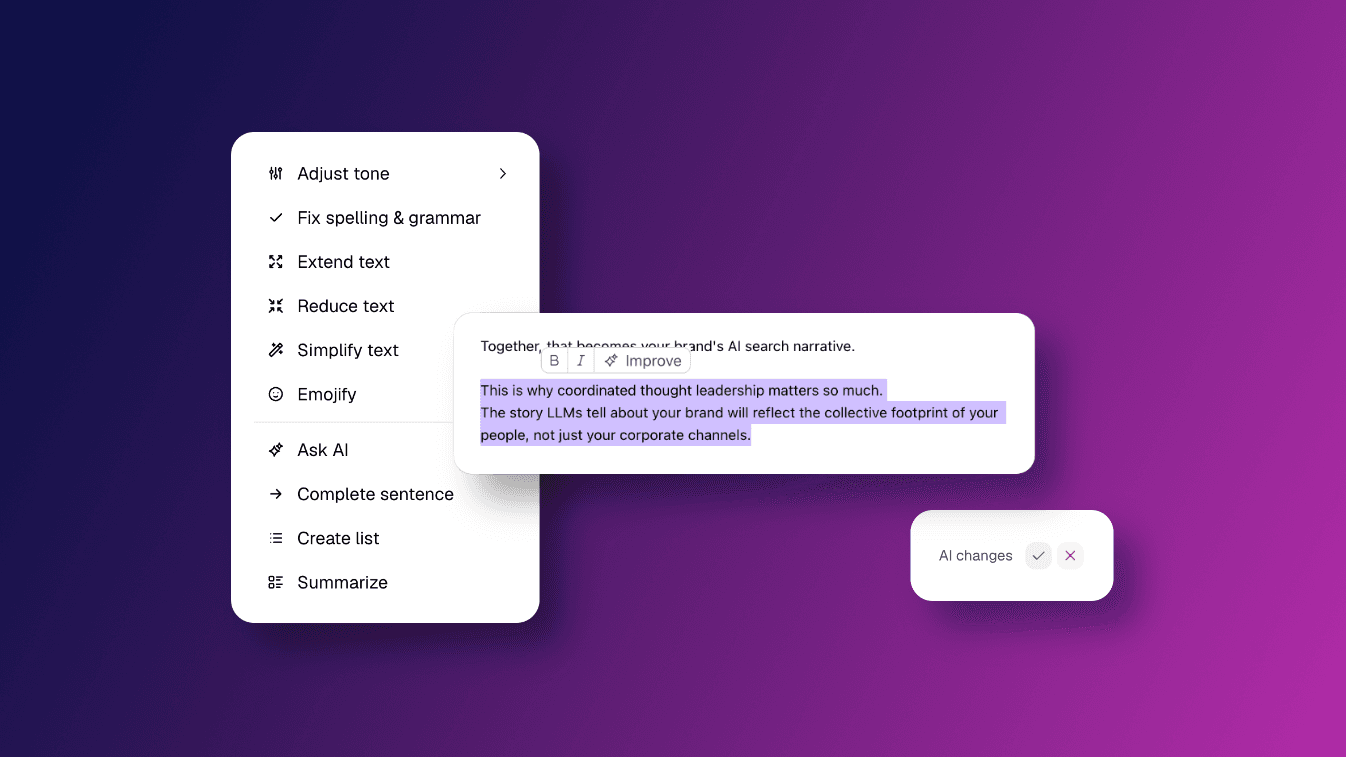
Inside the editor, you can now highlight any sentence or paragraph and click Improve. With one click, you can now easily adjust entire blocks of text. A compact action menu opens, giving you direct access to different editing options.
You can:
Adjust tone to make your text more conversational, more confident or more formal depending on the context.
Fix spelling & grammar to clean up language issues while keeping your original message.
Extend text to add more depth or context to a short section.
Reduce text to make a paragraph more concise without losing its core meaning.
Simplify text to clarify complex phrasing and improve readability.
Emojify to add emojis that match context and your style.
Ask AI to apply a specific instruction to the selected text.
Complete sentence to naturally finish an unfinished thought.
Create list to turn free-flowing text into a structured list.
Summarise to condense a longer section into a shorter version.
Every suggestion is shown before anything changes. You can accept or decline it.
 How does this work in Heyoo?
You can use AI Text Edit Shortcuts wherever you write or customise posts.
When you open a campaign suggestion and click Customise, or when you create a new post in the Thought Leader Hub, you work inside Heyoo’s editor.
As soon as you highlight text, a small toolbar appears. Alongside formatting options, you now see the Improve button.
After selecting an action, Heyoo generates a revised version of the marked text only. The rest of your post remains untouched. You can review the proposed change and either accept it or discard it.
Because the editor is connected to your personal tone of voice settings and your company profile, the suggestions stay aligned with your style and strategic direction.
 Why did we build this?
Writing becomes easier when you are not starting from scratch. Editing becomes easier when you do not have to rewrite everything.
With AI Text Edit Shortcuts, you can:
Refine your message with proven prompts
Strengthen specific paragraphs without changing the whole post
Structure your thoughts more clearly
Adjust your tone depending on context
You stay in control of every change. The AI supports you, but you decide what gets published.
This makes it simpler to turn a good draft into a post that truly reflects you.
Want to learn more about Heyoo.ai? Book a session here
Want to see it for yourself? Sign up for a free trial
01. Feb 2026
Share
We’ve simplified and upgraded how users define their personal tone of voice in Heyoo.
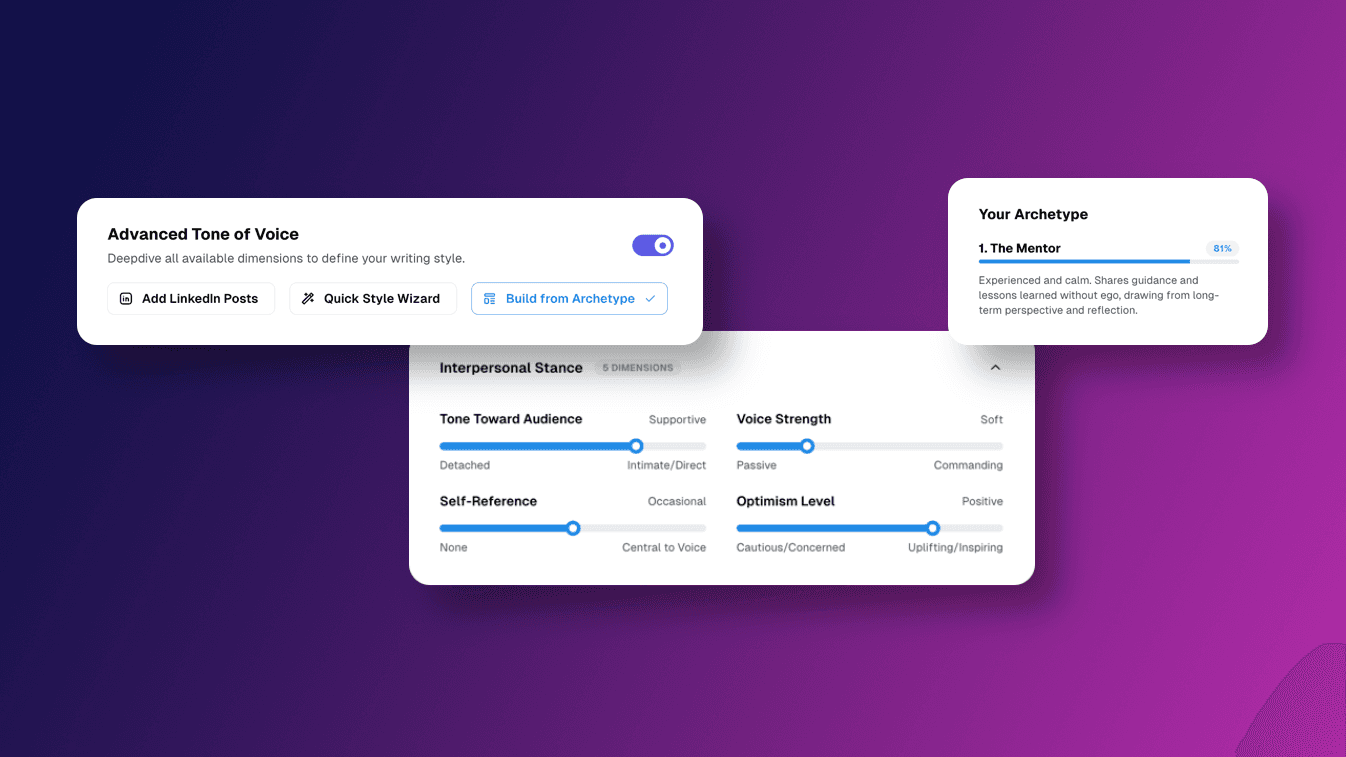
Users can still upload existing LinkedIn posts to analyse their writing style. But they can now also easily define their tone by choosing a ready-made archetype, using the Quick Style Wizard or manually adjusting different Tone Dimensions.
This is especially helpful for users who did not post actively on LinkedIn before and are just getting started.
What’s new exactly?Users can now choose how they want to sound in three simple ways:
Pick a Tone of Voice Archetype
Choose from ready-made archetypes like The Mentor, The Builder or The Optimist and many more. One click sets a strong baseline tone.
Use the Quick Style Wizard
Answer a few questions and Heyoo suggests the archetype that fits best based on your input. No writing examples needed.
Fine-tune with clear sliders
Users can adjust things like formality, boldness, structure, use of questions or formatting, without needing to understand copywriting terms.
See a live preview while adjusting
With the help of a preview post example, users immediately see what their choices do to tone and structure.
How it works in practiceA user selects an archetype, completes the Quick Style Wizard or uploads example LinkedIn posts
Heyoo pre-configures their tone of voice automatically
You can optionally tweak a few sliders to adjust different tone dimensions and give additional prompt instructions
The preview post shows the result right away
That is it. No long setup, no blank pages, no trial and error of generating posts.
 Why this is valuable for users
You do not need to know how to describe your writing style
You can clearly see what “sounds like me” before posting
Posts feel natural instead of generic or corporate
This lowers the barrier to posting and helps people feel confident sharing content.
 For admins and marketing teams
Faster and easier user onboarding
Less manual guidance needed on “how to sound”
Personal posts that still stay aligned with brand direction
Users can set up their own tone in minutes, without manual support. That makes advocacy easier to scale and easier to manage.
Want to learn more about Heyoo.ai? Book a session here
Want to see it for yourself? Sign up for a free trial
28. Dec 2025
Share
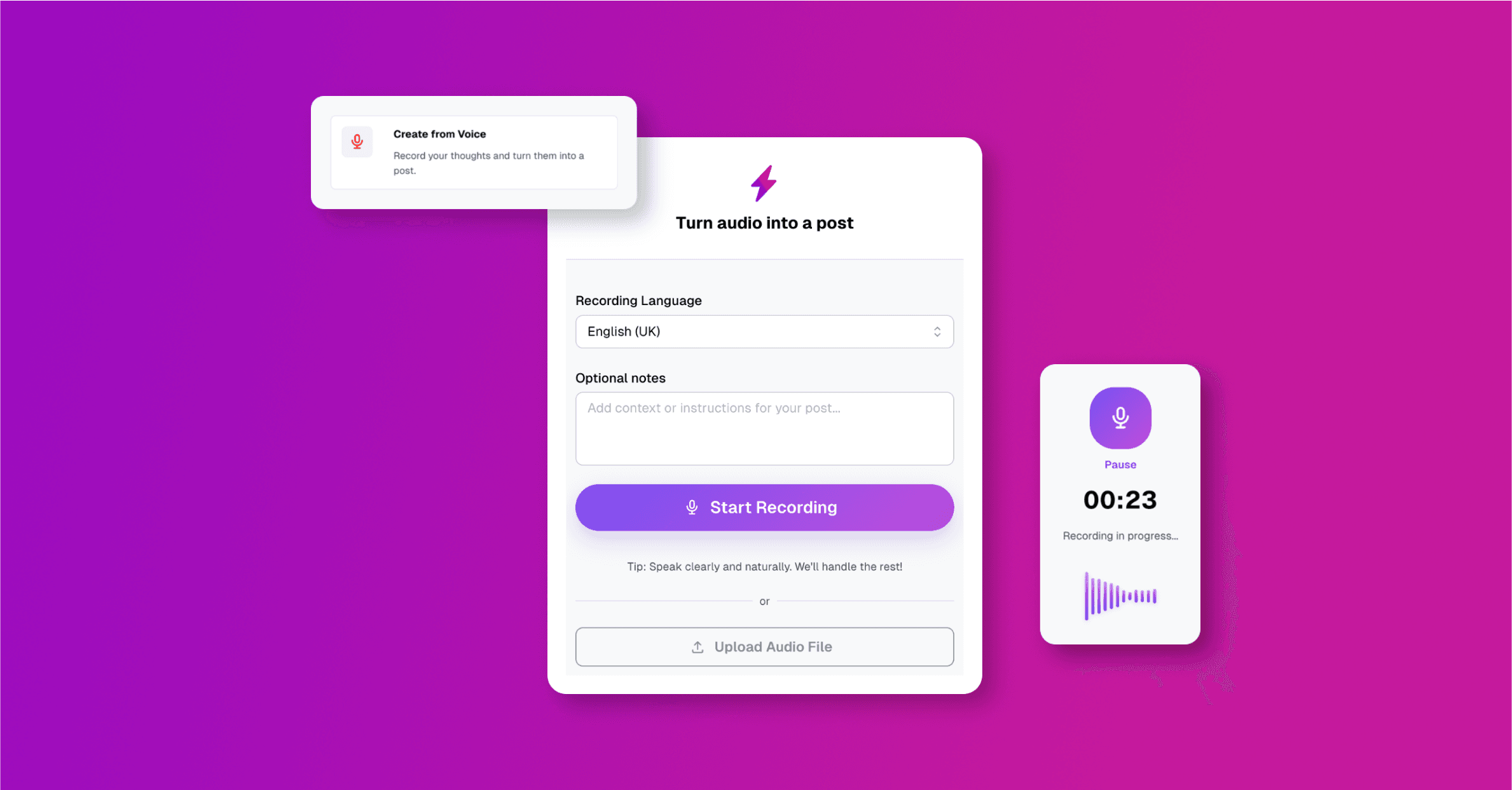
We’ve added a new way for users to turn their thoughts into authentic LinkedIn posts, without needing to type a single line. With Voice to Post, you can now simply speak your ideas and let Heyoo turn them into a structured post right away.
What’s new exactly?
You can now:
Record a voice note directly in Heyoo and speak freely in the language of your choice
Add optional written notes with extra context or instructions for the post
Upload an existing audio file and automatically turn it into a LinkedIn-ready post
How does this work in Heyoo?
Heyoo transcribes your audio, understands the context, and generates a post suggestion aligned with your personal tone, profile, and preferences. Any additional notes you add are used as guidance.
Why did we build this?
Voice to Post lowers the barrier to sharing even further. It’s ideal when ideas come on the go, after meetings, events, or conversations. Speaking is faster than writing, and the built-in editor lets you quickly refine the result before posting.
 Where to find it in Heyoo
Thought Leader Hub → Create from Voice
Want to learn more about Heyoo.ai? Book a session here
Want to see it for yourself? Sign up for a free trial
30. Sep 2025
Share
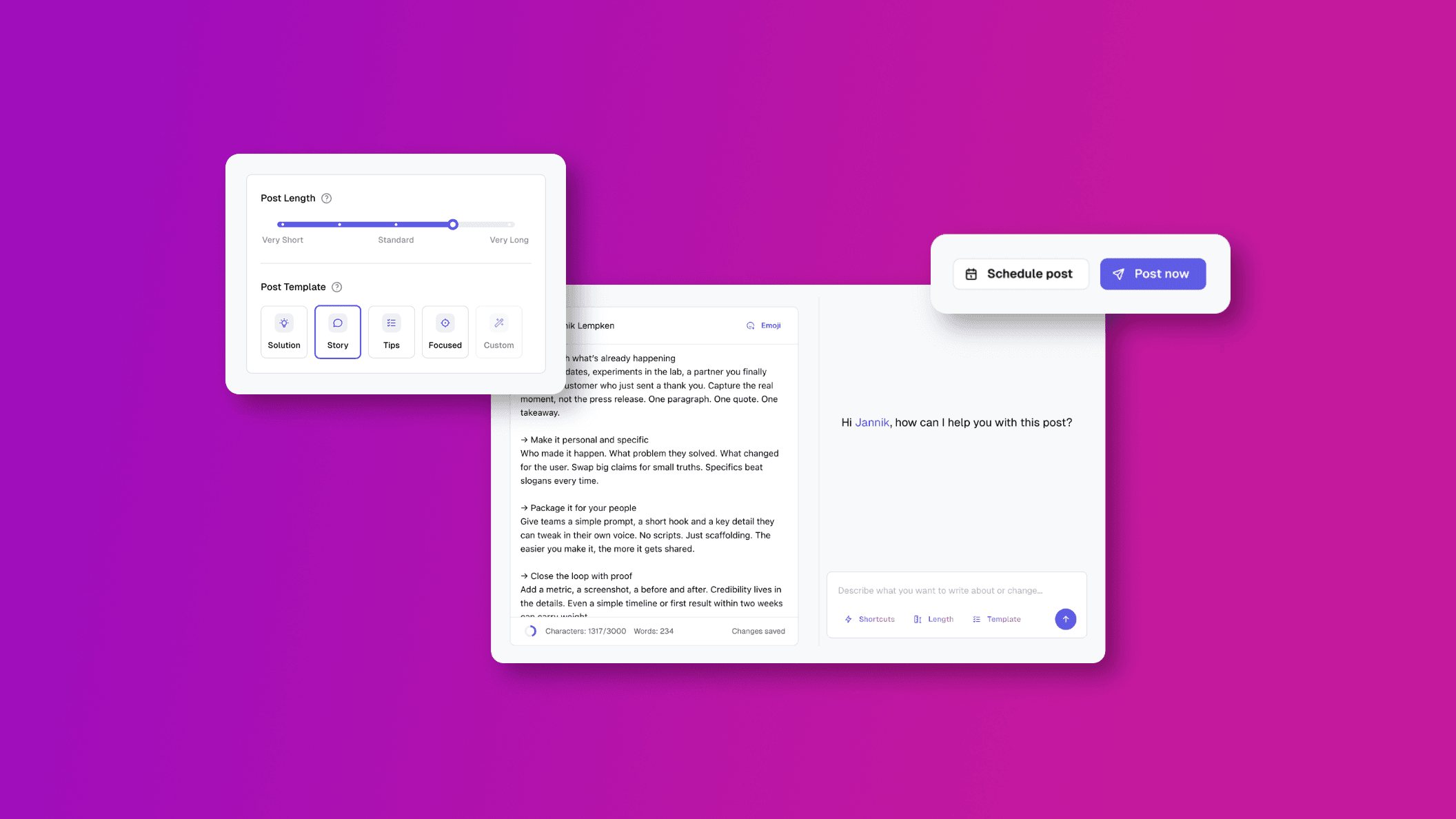
We’ve just released a major update and added a new way to manage thought leadership in Heyoo. With the new Thought Leader Hub, you can now create, schedule and manage posts for yourself or your company’s key voices all in one place.
 How it ties in with Heyoo’s Advocacy functionalities
The Thought Leader Hub and the Advocacy track work hand in hand:
Top voices lead the conversation through the Thought Leader Hub
These are your visible experts or executives setting the strategic narrative and showing what the brand stands for.
Employees amplify the message through the Advocacy track
Each employee receives their own personalised post suggestions aligned with those same themes, ensuring the message spreads organically through lots of authentic voices.
Together, they form a powerful visibility engine:
Leaders spark attention and authority → employees build reach and credibility → the brand gains consistent visibility and organic demand.
What’s new exactly?
You can now:
• Draft and schedule individual posts for yourself or on behalf of thought leaders
• Start posts from notes, a campaign, a link or completely from scratch
• Refine your content with the new interactive editor and built-in AI co-pilot
• Get a clear overview of all drafts, published posts and scheduled ones
How does this work in Heyoo?
The Thought Leader Hub makes it easy for admins and selected users to collaborate.
Admins can prepare drafts, send them for quick approval and ensure consistent visibility from leadership profiles without the usual back and forth. Thought leaders can also start posts themselves, making it easy to capture ideas while staying on-brand.
 Where to find it in Heyoo?
As an Admin go to Settings > Users > Edit User > Seat Type > “Thought Leader”
Want to learn more about Heyoo.ai? Book a session here
Want to see it for yourself? Sign up for a free trial