
12 nov 2026
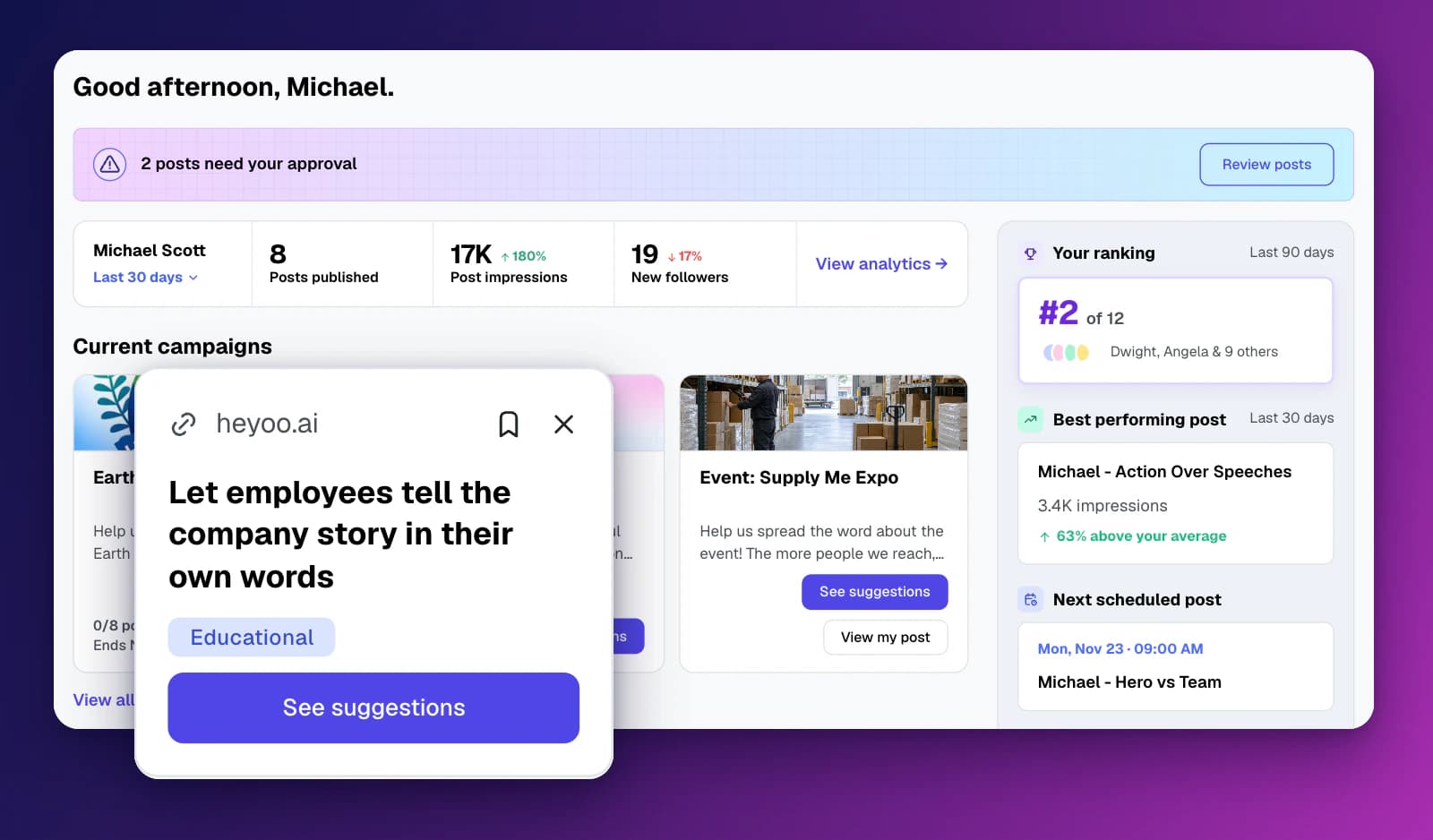
We have redesigned the Heyoo dashboard. Every user now starts their day with one clear overview of what needs their attention, how their LinkedIn posts are performing and what they could post about next.
The biggest addition is Post ideas for you: personalised post ideas that Heyoo creates from the sources your marketing team follows, shown directly on each person's dashboard.
The hardest part of posting on LinkedIn regularly is often not writing the post. It is knowing what to post about, and remembering to do it at all.
With the Heyoo Content Agent, marketing teams could already let Heyoo monitor blogs, news outlets, RSS feeds and LinkedIn Pages for relevant content. But for many employees, those suggestions were one click too far away.
At the same time, everything else that matters to an employee, such as approvals, active campaigns, scheduled posts and personal results, was spread across different pages.
The new dashboard brings all of this together. It gives every employee, executive and thought leader a clear reason to open Heyoo, see what is relevant to them and take the next step.
Post ideas for you
Heyoo turns new content from your Agent Content Sources into post ideas for individual people. Each idea card shows:
The source, such as a website or LinkedIn Page
The title of the idea
A category, such as Product update or Company news
A bookmark button to save the idea for later
A dismiss button to remove ideas that are not relevant
Select See suggestions to see the post suggestions Heyoo wrote for that idea, and turn one into a post in your own Tone of Voice.
Everything that needs your attention, in one place
The dashboard also shows:
Approvals: a banner when posts are waiting for your approval, with a direct link to review them
Your results: posts published, post impressions and new followers for the selected period, with a link to your full analytics
Current campaigns: active campaigns with direct access to your personal suggestions
Inspiration Questions: prompts to quickly start a post, each with Draft from this
Recent Activity: clicks from campaigns and posts shared by colleagues, so you can engage with them
In the right-hand column you will find:
Your ranking compared to your colleagues
Best performing post of the last 30 days
Next scheduled post, with its date and time
Latest company page post, with a direct link to LinkedIn
For marketing, it starts with the sources. Admins add and manage them under Settings → Agent Content Sources: blogs and other URLs, news outlets, RSS feeds and LinkedIn Pages. For each source, you can choose which employee groups it is relevant for.
Heyoo then monitors those sources and creates personal post ideas for the right people.
For everyone else, it starts on the dashboard:
Open Heyoo and look at Post ideas for you.
Check the source and category to see why the idea is relevant.
Bookmark ideas you want to use later, or dismiss ideas that do not fit.
Select See suggestions and turn the idea into a post in your own voice.
Edit, schedule or send it for approval, just like any other post.
With the new dashboard, Heyoo becomes the place where employees see in one glance what to do next on LinkedIn: approve a post, join a campaign, check their results or start a new post from a relevant idea.
Marketing decides which sources feed the ideas. Employees decide which ideas they use and how they want to tell them.
The new dashboard is now live for all Heyoo users.
💬 Want to learn more about Heyoo.ai? Book a personal demo here
👀 Want to see it for yourself? Sign up for a free trial