Wijzigingslogboeken
Blijf op de hoogte van de laatste wijzigingen en verbeteringen.
Blijf op de hoogte van de laatste wijzigingen en verbeteringen.

19. Sep 2026
Delen
The new Knowledge Base gives Heyoo detailed, relevant context about your company, so employee post suggestions and post drafts are grounded in the right facts, data points, product information and terminology.
Add research, presentations, product and service information, proprietary data, company knowledge, terminology, abbreviations and other relevant context under Settings → Knowledge Base.
Heyoo uses relevant information from your Knowledge Base when creating content. This makes post suggestions and drafts more specific, accurate and informed by what your company actually knows.
And the company context does not replace the individual voice. Employees, executives and subject matter experts still bring their own perspective, experience and personal tone of voice.
Every company has valuable knowledge that should make its way into its LinkedIn content.
But that knowledge often lives in different places. Product details sit in documentation. Research findings live in reports. Customer insights are buried in presentations. Important terminology exists in internal guides. Proprietary data, benchmarks and frameworks might only be known by a small group of people.
The Knowledge Base brings this context into Heyoo and makes it available when content is created.
Some of the most valuable input can be knowledge that only your company has: your own research, survey results, benchmarks, customer insights, product data, methodologies or learnings from work your team has actually done.
For example:
• Your company conducted an industry survey: Add the research to the Knowledge Base so Heyoo can use relevant findings and data points when creating posts around that topic.
• Your team has its own methodology or product terminology: Add it to Heyoo so post suggestions reflect the actual framework, facts and language your company uses.
This is also becoming increasingly relevant for AI visibility. Research into LinkedIn content cited in AI search points towards the importance of original expertise, useful explanations, specific evidence and data. Knowledge that only your company has gives your employees and experts something genuinely valuable to contribute.
Our article Employee Advocacy Is How You Build AI Search Visibility on LinkedIn goes deeper into why company expertise, proprietary knowledge and individual employee perspectives matter for AI search. Read the article
The Knowledge Base has two parts:
1. Company knowledge
Build a central source of company context for Heyoo, including:
• Product and service information
• Research and proprietary data
• Industry knowledge
• Company positioning and stories
• Internal terminology and abbreviations
• Product names and descriptions
• Presentations and other relevant company material
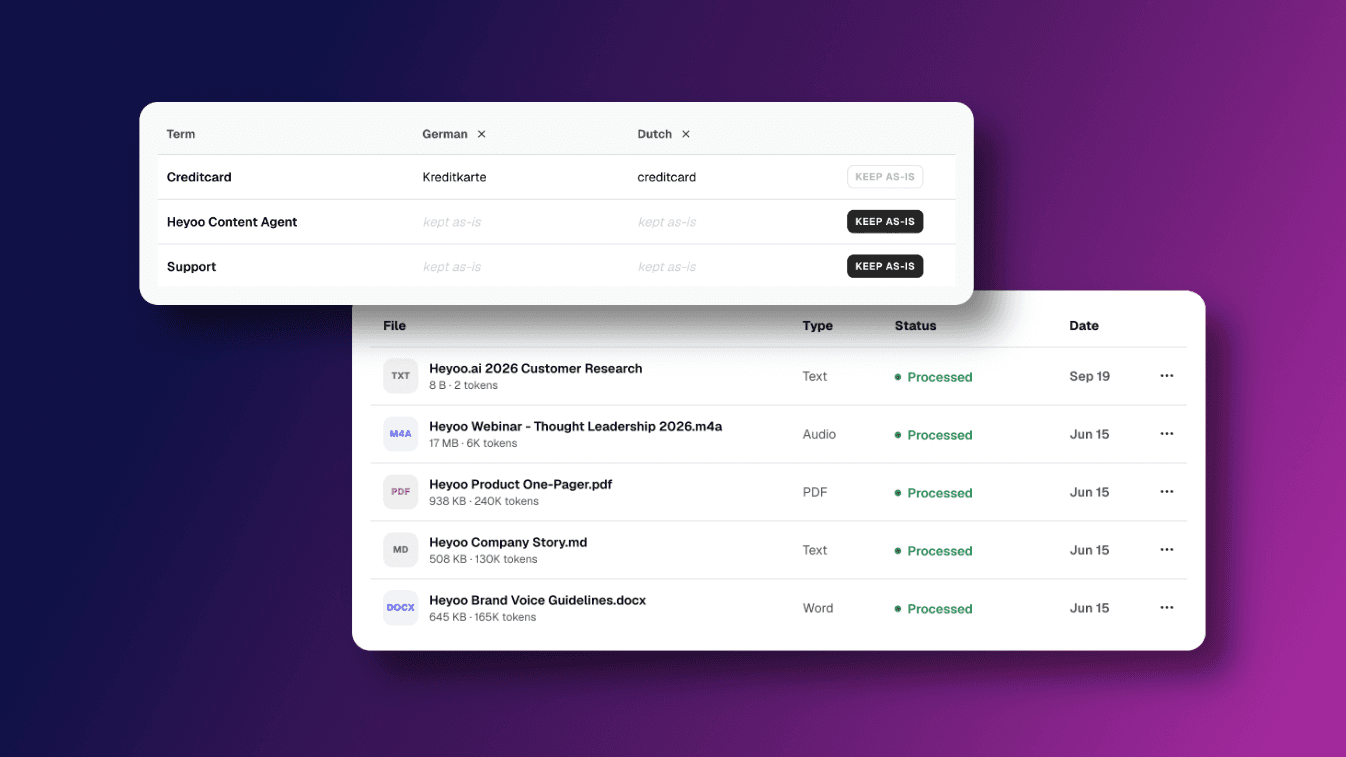
Upload supported files (.pdf, .md, .docx, audio and more) or add information directly as text.
Heyoo draws on relevant information from your Knowledge Base when creating employee post suggestions and post drafts.
2. Languages
Your company terminology should stay correct and consistent, even when content is created in different languages.
In the Languages section, admins can:
• Add company specific terms
• Define the preferred translation for each language
• Add additional languages
• Mark terms as Keep as is when they should remain unchanged
• Manage terminology centrally across the workspace
This is especially useful for product names, technical terminology, abbreviations and other wording that needs to remain accurate across languages.
Go to Settings → Knowledge Base.
Under Files, add the company knowledge and context Heyoo should use when creating content.
Heyoo then draws on relevant information from those sources when creating employee post suggestions and post drafts.
Under Languages, define exactly how important terminology should be written in different languages or mark terms that should always remain unchanged.
The result is more specific and informed LinkedIn content grounded in your company's real knowledge, without making everyone sound the same.
The Knowledge Base is now live under Settings → Knowledge Base in Heyoo.
 Want to learn more about Heyoo.ai? Book a personal demo here
 Want to see it for yourself? Sign up for a free trial